The right eCommerce website design ideas can help businesses create an online store that attracts customers, builds trust, and makes shopping easier. Effective eCommerce design involves more than choosing colors and arranging product images.
It considers how visitors discover products, compare options, understand product details, and complete purchases. A successful store combines visual appeal with intuitive navigation, mobile responsiveness, accessibility, and a straightforward checkout process.
These elements work together to create a positive shopping experience while supporting business goals. Whether you are launching a new online store or improving an existing one, thoughtful design decisions can help customers shop with confidence and encourage them to return.
Why Is eCommerce Website Design Important?
Website design affects how customers perceive a business and how easily they can complete a purchase. A well-designed online store provides a clear path from product discovery to checkout while presenting the brand professionally.
- Creates a Strong First Impression: A professional layout, consistent branding, and clear messaging help visitors understand what your business offers. A positive first impression encourages them to explore the store and learn more about your products.
- Makes Products Easier to Discover: Logical categories, useful filters, and organized product listings help shoppers find relevant items. Customers can narrow their choices without searching through unrelated products.
- Improves Navigation and Usability: Clear menus, descriptive labels, and consistent page layouts make the website easier to use. Visitors can move between categories, product pages, and the shopping cart without unnecessary confusion.
- Reduces Checkout Friction: A simple checkout process helps customers complete their purchases with fewer obstacles. Clear pricing, understandable forms, and appropriate payment options can reduce avoidable frustration.
- Supports Mobile Shoppers: Responsive design allows customers to browse and purchase products on smartphones and tablets. Readable text, touch-friendly buttons, and mobile-friendly forms make shopping more convenient.
- Strengthens Brand Identity: Consistent typography, colors, imagery, and messaging create a recognizable visual identity. This helps customers distinguish your store from competitors and develop a clearer understanding of your brand.
- Encourages Repeat Purchases: A smooth shopping experience, reliable service, and easy access to products can motivate customers to shop with you again. Returning customers may also be more likely to recommend your store to others.
12 eCommerce Website Design Ideas to Inspire Your Online Store
To build a high-converting online store, you need practical layout strategies that enhance usability, hold attention, and guide shoppers toward buying. Here are twelve proven design ideas you can apply to your site.
1. Use a Clean and Minimalist Website Layout
A clean layout eliminates visual chaos and keeps customer attention centered squarely on your inventory. Generous whitespace around product cards prevents visual fatigue and makes your catalog look high-end and organized. Clear visual hierarchy guides the user’s eye from primary headings down to product details without friction. Minimalist designs look modern, feel light, and load much faster on mobile and desktop devices alike.
Key benefits of a minimalist layout include:
- Reduced cognitive load: Visitors locate items faster without competing banners or sidebars.
- Faster load times: Fewer heavy decorative elements speed up page rendering.
- Enhanced focus: Essential details like pricing and primary buttons stand out immediately.
2. Create an Engaging Homepage Design
Your homepage acts as the digital storefront of your business and must make an impact in seconds. Place prominent promotional banners near the top to highlight key seasonal campaigns or limited-time offers.
Feature top-selling products and curated collections directly on the main page to spark immediate buyer interest. Provide clear category shortcuts so visitors can jump straight to the exact department they want to explore, while bold calls to action guide shoppers smoothly into your sales funnel.
3. Design Easy-to-Use Navigation Menus
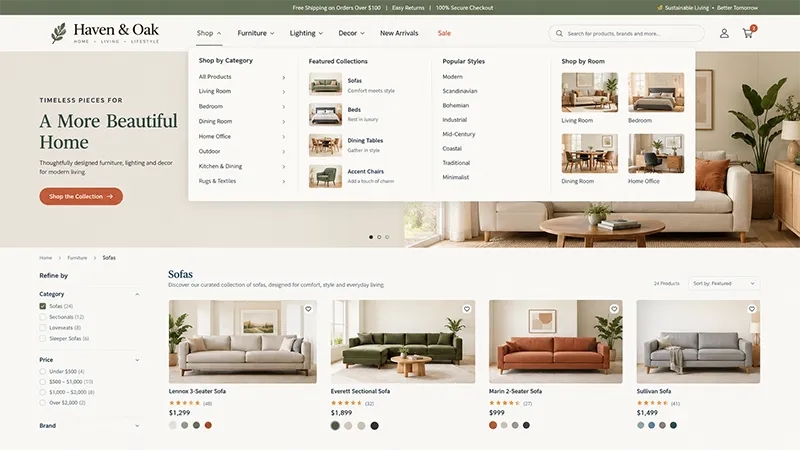
Simple menus are central to any collection of eCommerce website design ideas. Organize your products into logical categories and use intuitive dropdown menus for deeper subcategories.
Label every section clearly so buyers never have to guess where a navigation link leads. Include an accessible search bar near the top of every page for instant query entry, and use breadcrumbs on deeper pages so shoppers can track their position and return to main categories quickly.
4. Use High-Quality Product Images and Videos
Visual representations replace the tactile experience of shopping in a physical retail store. High-quality visual assets build customer confidence and help set accurate expectations before an order is placed.
To present your inventory effectively:
- Multiple product angles: Show front, back, side, and close-up views to provide a complete perspective.
- Zoom functionality: Enable smooth zoom options for close inspection of fabrics, textures, and fine craftsmanship.
- Lifestyle photography: Display products in practical context to help customers visualize real-world use.
- Product demonstration videos: Add short video clips showcasing product movement, assembly, or practical features.
- Consistent framing and lighting: Keep aspect ratios and lighting uniform across all product listings.
5. Build Clear and Informative Product Pages
Your product pages need to answer every question a buyer might have before making a purchase decision. Write detailed product descriptions that focus on practical benefits and technical specifications.
Clearly state pricing, stock availability, and selectable variants like size, color, or material. Display estimated delivery times and shipping costs early so buyers have full transparency, while verified customer reviews and prominent Add to Cart buttons remain visible without requiring excessive scrolling.
6. Add Smart Product Search and Filters
For stores with large and diverse catalogs, robust search features are mandatory to keep product discovery simple and swift.
Essential search and discovery features include:
- Autocomplete and suggestions: Display instant product and category matches as the user types.
- Multi-attribute filters: Allow shoppers to refine results by size, price range, color, brand, or availability.
- Flexible sorting options: Let users organize results by popularity, customer ratings, newest arrivals, or price.
- Relevant zero-result handling: Provide helpful suggestions or popular alternatives if an exact search term has no match.
7. Make the Website Mobile-Friendly
Mobile devices generate a massive portion of online store traffic across every retail sector. Use responsive layouts that adapt fluidly to screen sizes of any dimension.
Keep font sizes readable without requiring users to pinch and zoom on small screens, and design touch-friendly buttons with ample spacing to prevent accidental taps. Simplify navigation drawers for smaller screens so browsing through collections remains effortless.
8. Simplify the Shopping Cart and Checkout
Checkout friction is a leading cause of abandoned sales in digital retail. Streamlining this final stage directly boosts completed transactions.
A streamlined checkout process should offer:
- Guest checkout option: Allow shoppers to complete purchases without being forced to register an account.
- Fewer form fields: Collect only essential shipping, billing, and contact details.
- Transparent costs: Display taxes, shipping fees, and discounts upfront before the final payment step.
- Multiple payment options: Support credit cards, digital wallets, and buy-now-pay-later options.
- Progress indicators: Show clear steps (e.g., Shipping > Payment > Review) so users know where they are.
- Clear error messages: Highlight missing or incorrect field entries in real time with helpful tips.
9. Use Consistent Brand Colours and Typography
Visual consistency reinforces brand recognition and builds lasting customer loyalty. Select a cohesive color palette that reflects your brand personality while maintaining high contrast for readability.
Stick to two or three primary fonts across the entire website, and ensure primary action buttons use a uniform accent color so shoppers recognize interactive elements instantly across every page.
10. Display Customer Reviews and Trust Signals
Social proof reduces buying hesitation significantly and reassures hesitant shoppers throughout their buying journey.
Key trust signals to display include:
- Verified buyer reviews: Show authentic customer ratings and detailed text feedback directly on product pages.
- Security badges: Place SSL seals and secure payment badges near checkout forms to reassure shoppers.
- Clear return policies: Link to fair return and exchange terms near purchase buttons and in the footer.
- Accessible contact information: Provide direct phone numbers, email addresses, or physical business locations.
11. Add Personalised Product Recommendations
Personalization keeps buyers engaged longer and increases average order value across transactions.
Display related products or complementary accessories on individual product pages, and show a recently viewed section to help shoppers jump back to items they evaluated earlier in their session.
Use browsing history to suggest items tailored to specific customer preferences so cross-selling feels genuinely helpful.
12. Use Clear Calls to Action
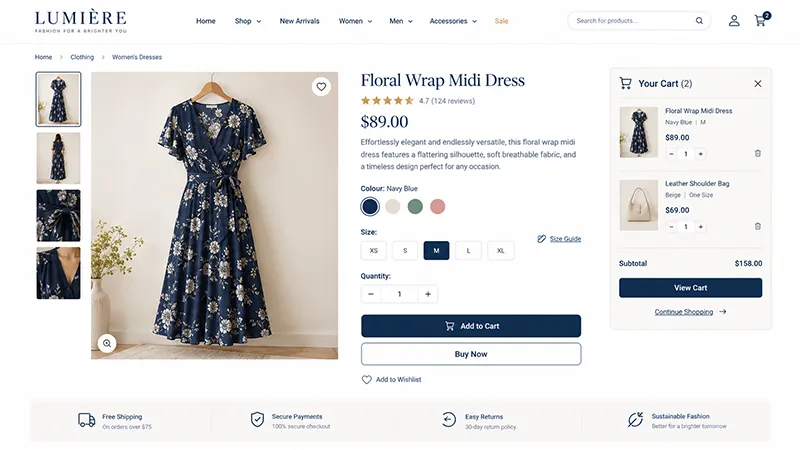
A call to action should leave zero doubt about what action happens next when a user clicks. Use descriptive, action-oriented labels like Shop Now, Add to Cart, or Proceed to Checkout.
Design primary buttons with high-contrast colors so they stand out from background elements instantly, and keep them positioned predictably across all screen sizes so buyers can move forward without friction.
Essential Features of a Well-Designed eCommerce Website
Beyond visual layouts, every online store depends on robust underlying features of an ecommerce website to support daily operations, inventory management, and customer satisfaction.
- Product catalogue management: Structured category trees, manageable product variants, and real-time inventory tracking across warehouses.
- Site-wide search: Predictive query handling, keyword matching, and flexible filtering choices for rapid discovery.
- Shopping cart and checkout: Persistent carts, simple item removal, and transparent price updates before payment.
- Secure payment integration: SSL encryption, tokenized checkout systems, and trusted payment gateways for financial security.
- Customer accounts: Order history tracking, saved shipping addresses, and wish list management for registered users.
- Order tracking: Automated shipping confirmation emails and real-time package tracking links for customer reassurance.
- Customer support: Accessible contact options, organized FAQ sections, and responsive live chat support.
- Accessibility: Full keyboard navigation, proper color contrast ratios, descriptive image alt text, and screen-reader accessible forms.
- Performance optimisation: Optimized image formats, browser caching, and fast server response times for speed.
- SEO-friendly structure: Clean URL paths, logical heading hierarchies, crawlable links, and schema markup for products.
eCommerce Website Design Trends Worth Considering
Staying competitive in digital retail means incorporating trends that offer genuine utility to your buyers rather than chasing empty visual gimmicks.
Personalised Shopping Experiences
Personalized shopping uses smart algorithms to show relevant dynamic banners, localized currency settings, and curated product collections based on past user interactions and purchase history.
Interactive Product Visualisation
Interactive tools, such as 360-degree product views and custom configurators, allow buyers to customize items in real time. Where practical, augmented reality helps customers preview products inside their actual physical spaces before buying.
Mobile-First Shopping Experiences
Designing for mobile screens first ensures that tap targets, navigation menus, and checkout flows work perfectly on mobile devices before scaling up to larger desktop monitors.
Rich Product Storytelling
High-converting stores combine lifestyle imagery, video walkthroughs, and rich narrative copy to showcase product craft, origin, and real-world value to prospective buyers.
Simplified and Accessible Interfaces
Minimalist user interfaces rely on high contrast, readable sans-serif typography, and uncluttered layouts to ensure accessibility for all users, regardless of technical ability.
eCommerce Website Design Examples to Learn From
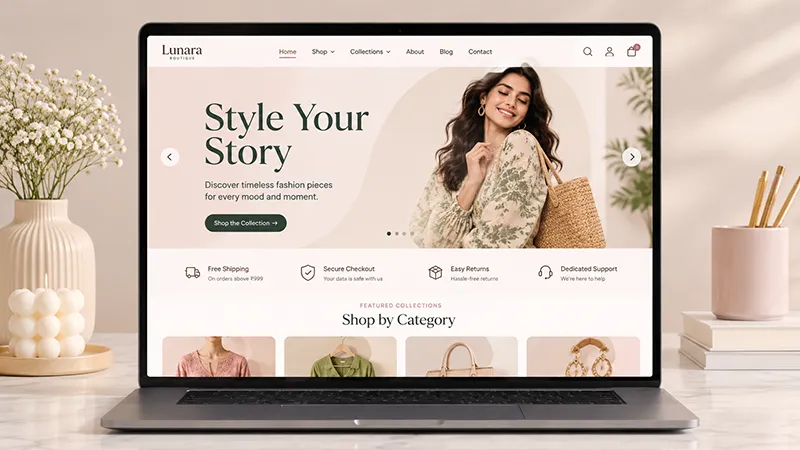
Exploring eCommerce website design examples can help you understand how successful online stores organise their layouts, showcase products and guide customers through the buying process.
Pay attention to their navigation menus, product page layouts, visual consistency and checkout experience.
These elements can offer useful ideas for improving your own store while helping you identify design approaches that suit your products, brand identity and target audience.
Common eCommerce Website Design Mistakes to Avoid
Even a visually appealing online store can lose customers if important information is difficult to find or basic shopping tasks feel complicated. Avoid these common mistakes when developing or improving your store.
Overcrowded Homepages and Confusing Navigation
Too many banners, categories, and promotional messages compete for attention. Prioritize useful content and organize navigation around how customers shop.
Low-Quality or Inconsistent Product Images
Blurry photographs and inconsistent backgrounds can make products appear less appealing. Use clear images with consistent styling and enough detail to support purchasing decisions.
Incomplete Product Information
Missing specifications, sizing details, material information, or compatibility requirements can leave shoppers uncertain. Provide the details customers need before they add an item to their cart.
Hidden Shipping Costs or Unexpected Checkout Fees
Additional charges revealed at the final step can frustrate customers. Display shipping costs, applicable taxes, and other fees as early as practical.
Complicated Checkout Forms
Unnecessary fields and confusing instructions create avoidable friction. Request only essential information and explain errors clearly when customers need to correct their entries.
Intrusive Pop-Ups and Excessive Promotional Banners
Repeated pop-ups can interrupt browsing, particularly on mobile devices. Use promotional messages selectively and make them easy to dismiss.
Slow-Loading Pages and Unoptimized Images
Large image files, excessive scripts, and inefficient page elements can affect performance. Optimize media and remove unnecessary functionality that slows down the shopping experience.
Poor Mobile Usability
Small buttons, cramped layouts, and difficult forms make purchasing harder on smartphones. Test important shopping tasks on different screen sizes and correct usability problems.
Weak Accessibility and Insufficient Color Contrast
Low-contrast text, unlabeled form fields, and inaccessible menus can prevent people from using the store effectively. Build accessibility into the design rather than treating it as a final adjustment.
Neglecting Testing and Performance Monitoring
A design that looks good in a mockup may not work as expected on a live website. Test links, product options, cart updates, payment steps, and confirmation messages before and after major changes.
How to Improve Your Existing eCommerce Web Design
You do not always need to rebuild an entire store to improve its performance. Start by identifying the biggest problems in the current shopping experience. The following steps can help you prioritize meaningful improvements.
1. Review Analytics to Identify Pages Where Users Drop Off
Examine website analytics to understand how visitors move through the store. Review product views, add-to-cart activity, checkout progression, and completed purchases. A high exit rate on a particular page may indicate a problem, although it does not automatically mean the design is responsible. Investigate the context before making changes.
2. Test Navigation and Search Using Common Customer Tasks
Ask people to find a specific product, compare two items, or locate a return policy. Observe where they hesitate or make mistakes. Improve category labels, search results, and navigation paths based on the difficulties they encounter.
3. Check Mobile Usability Across Important Pages
Test the homepage, category listings, product pages, shopping cart, and checkout on smartphones and tablets. Check text readability, button placement, image sizing, and form behavior. Fix issues that prevent customers from completing important actions.
4. Simplify Product Pages and Checkout Steps Where Needed
Review whether product information is complete and easy to scan. Make prices, delivery details, product options, and purchase buttons easy to find. Remove unnecessary checkout fields and clarify confusing instructions.
5. Optimize Images and Page Performance
Compress images, use suitable image dimensions, and remove unnecessary scripts or heavy design elements. Monitor loading performance on mobile and desktop devices. Prioritize improvements that affect important shopping pages.
6. Test Design Changes and Compare Results
Measure the impact of changes using relevant metrics, such as conversion rate, cart abandonment, completed purchases, and revenue per visitor. Where possible, use controlled A/B tests to compare different versions. Make decisions based on observed results rather than assumptions about what customers prefer.
Conclusion: eCommerce Website Design Ideas for Long-Term Success
The most effective eCommerce website design ideas focus on making online shopping clear, convenient, and trustworthy. A clean layout, intuitive navigation, high-quality product imagery, informative product pages, and a straightforward checkout can help customers make confident purchasing decisions.
However, good design is not just about appearance. Your store also needs reliable functionality, mobile responsiveness, accessibility, and strong performance. The right approach depends on your products, target audience, and business objectives.
Start with improvements that address real customer needs, then use testing and analytics to guide future decisions. By combining thoughtful design with continuous improvement, you can create a shopping experience that supports customer satisfaction and long-term business growth.
Need a Web Design Company for Your Online Store?
Bhavyam Digital is a professional web design company in Kerala that helps businesses create user-friendly, visually appealing, and conversion-focused websites. Our team can help you build an online store that reflects your brand, showcases your products, and provides a smooth shopping experience across devices. Get your free quote today to discuss your eCommerce website requirements.